Progress and notifications
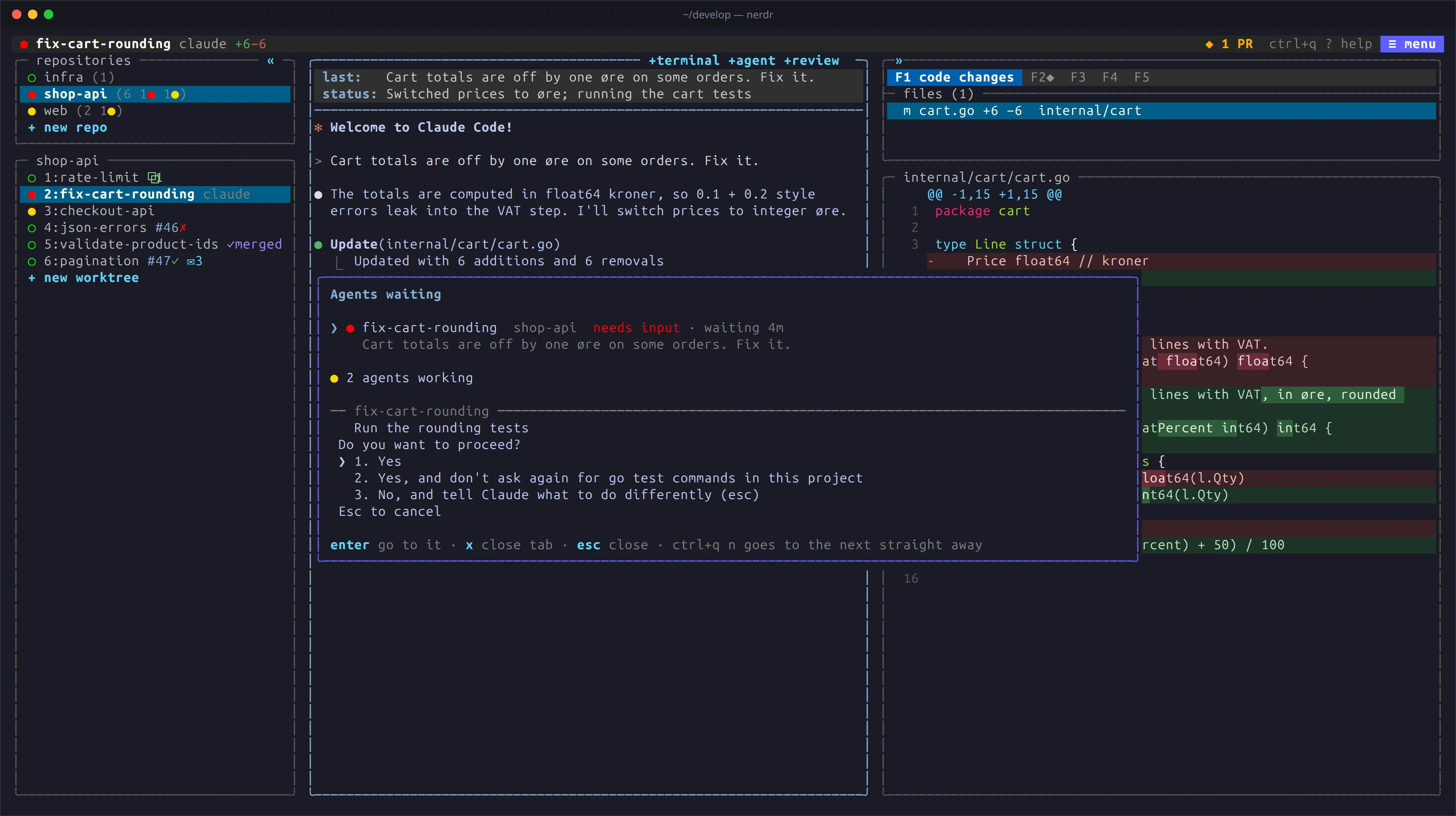
With several agents at work, the question is always the same: which one needs me? nerdr answers it at a glance, and takes you there.
Status lights
Section titled “Status lights”Every tab, and every agent in a tab, has a light:
| Light | Meaning |
|---|---|
| ● yellow | Working |
| ● cyan | Turn over, but a process the agent started in the background still runs |
| ● red | Needs your input: a question or a permission |
| ● green | Done, and not yet seen |
| ○ | Seen, or idle |
z blue |
Asleep |
Set status_lights = "symbols" to tell them apart by shape as well:
◐ working, ◎ background process, × needs input, ✓ done. A done tab counts as seen once it
has been the active tab for a second while nerdr has focus, so passing
it on the way to another tab leaves it green.
nerdr knows an agent’s state from the agent’s own hooks where it has them, and from its screen otherwise; see How it works.
The waiting list
Section titled “The waiting list”The top bar counts the other tabs waiting for you, and turns red for
questions. Click it or press ctrl+q w for the waiting list: questions
first, then finished work, the oldest first, each with the agent’s latest
message. enter goes to the tab, x closes it. Cold tabs are listed
below.
ctrl+q n skips the list and goes straight to the next agent waiting.
Tab badges
Section titled “Tab badges”The tab list shows more than the light:
| Badge | Meaning |
|---|---|
+98-4 |
Lines changed on the branch |
#12✓ / #12✗ |
The pull request, its CI passing or failing |
✓merged |
The pull request is merged; the tab can be closed |
#12 merged·1 after |
The pull request is merged, but the branch has one more commit since, not yet in any pull request |
⚠ |
Files this tab changes that another tab changes too |
✉2 |
Tasks waiting in F3 |
❄ |
Cold: no activity for cold_days days |
Later edits mark the CI result as outdated. ctrl+q z d hides the
details, and tab_details = false starts without them.
Notifications
Section titled “Notifications”When nerdr’s window does not have focus, it sends a desktop notification;
when you are in another tab, a message in the bar. notify chooses when:
all (the default), blocked (an agent needs input), done or off.
Inside herdr, notifications go through herdr.
nerdr also watches GitHub for you:
- Your pull requests: failed checks and new reviews, marked
◆on F2 until you look.pr_notify = falseturns this off. - Issues assigned to you in these repositories, checked every few
minutes.
issue_notify = falseturns this off.
What happened while nerdr was stopped is reported at the next start.
What happened while you were away
Section titled “What happened while you were away”ctrl+q h shows a tab’s history since your last visit: the agent’s turns
and questions, messages sent, new commits, pull request and CI changes.
In F1, ◆ marks the files changed since your last visit.
Usage and rate limits
Section titled “Usage and rate limits”ctrl+q u shows how much of your Claude and Codex plans’ 5-hour and
weekly limits is used, when each resets, and how full each agent’s
context window is. nerdr reads what the agents say themselves and never
asks their services or reads their sign-ins.
Codex writes its limits into its logs. Claude gives them only to its
status line, so nerdr starts claude with a status line of its own. It
passes the limits to nerdr, then shows the status line from your
claude settings, or a short one if you have none. Set claude_status_line = false to
leave claude’s status line alone.
Searching past conversations
Section titled “Searching past conversations”ctrl+q / searches what you and the agents said in the claude and codex
conversations in your repositories and worktrees. Type some words, and
the conversations that have all of them are listed, the latest first.
enter goes to the agent that has the conversation, or continues it in
a new pane in the tab for its worktree.
Agents asleep
Section titled “Agents asleep”When nerdr starts, it starts the agents of the tab on screen first, and
the others a moment apart. Agents of cold tabs are not started: they are
asleep, shown with a blue z, until you visit the tab, and then continue
their conversations.
Set sleep_after to a number of minutes to put agents to sleep while
nerdr runs, too: once a tab’s agents are done, seen and out of sight for
that long, nerdr stops them. A tab stays awake while it has a task
waiting, a question, a code review, or an agent whose conversation could
not be resumed. Terminals keep running, and a task queued for a sleeping
tab wakes it.
Keeping the machine awake
Section titled “Keeping the machine awake”Agents keep working behind a locked screen, but pause when the machine sleeps. By default nerdr keeps the machine awake while an agent or reviewer works, and for a minute after. See Keeping the machine awake.