Agents working together
nerdr teaches its agents to use nerdr. Through a handful of commands and the skills that explain them, an agent can talk to the other agents in its tab, start more of them, see the other tabs, run a dev server in a terminal you see, and split its work into new tabs. You ask in plain words; the agent knows the command.
Messages between agents
Section titled “Messages between agents”Ask agent 1 to “send the plan to agent 2”, and agent 2 gets it as a
task. nerdr types it in when agent 2 is idle, with a line saying it is
from agent 1 and how to answer. Agents do this with nerdr send, which the nerdr-send
skill teaches them. nerdr send without a number lists the tab’s agents.
Above, Claude and Codex play chess in one tab: Claude opens the board in a
terminal and starts Codex, and they send each other moves with
nerdr send.
Starting more agents
Section titled “Starting more agents”Ask agent 1 to “start a codex agent to write the tests”, and a new pane
opens beside it with that task. The new agent reports back to agent 1
with nerdr send, and the keyboard stays where it was. Agents can name
the kind of agent and its model, in the agent’s own names (haiku for
claude, say).
Agents in a tab share its worktree, so the skill tells them to give each agent its own files. To have several agents try the same task, ask for a spinoff instead (below), so each gets a worktree of its own.
What agents can see and do
Section titled “What agents can see and do”| Command | What it does |
|---|---|
nerdr agents |
The tab’s agents: number, kind, model, state, context |
nerdr wait N… |
Wait until those agents are done or ask something |
nerdr read N |
What agent N or a terminal pane shows, as text |
nerdr terminal CMD |
Run a command in a new terminal pane you see |
nerdr tabs |
Every tab: branches, changes, pull request, CI, agents |
nerdr status TEXT |
Set the line on where the work stands, above the agent |
nerdr tab new |
A tab on a new branch, its agent given a task |
nerdr search WORDS |
Past claude and codex conversations |
nerdr usage |
The Claude and Codex plans’ rate limits |
The full list, with options, is in Commands for agents. Agents close a terminal or another agent’s pane only when you ask, and only you close tabs and the tab’s first agent.
Splitting work into new tabs
Section titled “Splitting work into new tabs”Ask the agent to “split this into branches” or “make a branch for the
parser fix”. The nerdr-spinoff skill has it commit each part separately
and ask nerdr for a tab for each. The tab turns red, and a dialog shows
each part with a summary and a branch name you can edit:
- If the agent supplied commits, choose whether to cherry-pick them onto a fresh branch from main, or let the new agent do the task from its prompt.
- Pick the agent for the part with
↑/↓. - In a tab on several repositories, tick the repositories the part changes; a part in one repository gets a plain tab for it.
- The part is made in the tab’s repositories unless you or the agent pick
others.
ctrl+rlists every repository nerdr has to tick from, andctrl+ragain shows only the ticked ones. Commits cannot go to another repository: there, the new agent writes the change from its prompt. ctrl+oshows the new agent’s prompt,entercreates the tab,ctrl+xskips this part andescskips the rest.
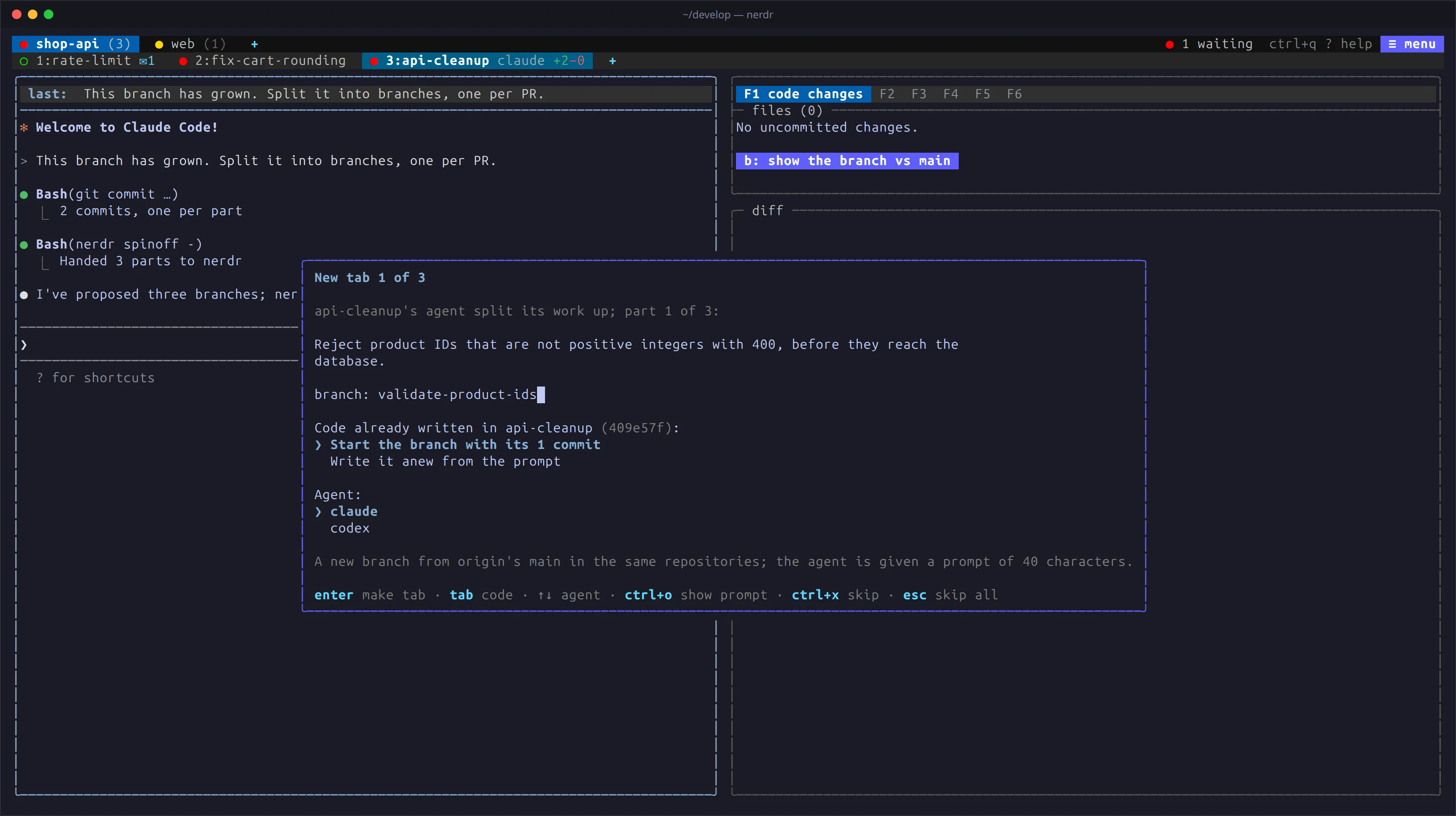
The original agent is told about the new tabs and their branches, and reminded to leave the moved commits out of its own pull request. Commits that do not apply cleanly are left out, and the new agent is told to make those changes itself.
Switching a tab’s agent
Section titled “Switching a tab’s agent”ctrl+q a s replaces the tab’s agent with another, in the same worktree.
While the current agent runs, choose how to pass on what it knows:
- Switch now. nerdr turns the conversation into a handoff file for the new agent: your messages, the agent’s replies and one line per tool call.
- Ask for a handoff first. The old agent writes down the goal,
decisions, findings, what is done and what remains, and hands it over
with
nerdr handoff. The request carries the writing instructions, so this works even withnerdr-handoffoff or uninstalled. The status panel showsswap:meanwhile; pressctrl+q a sagain to switch at once or cancel. If no handoff comes within five minutes, nerdr switches as above.
The new agent reads the worktree, sums up its understanding and waits for you. Switching back to an earlier agent resumes its conversation and tells it what happened in between.
Questions from agents
Section titled “Questions from agents”Agents ask their questions in their own conversation, where you answer them. An agent asking is marked as needing input, its tab turns red, and it is first in the waiting list.